Apple2 Assembly Hello, World
Every development example starts with the classic “Hello, world!” and this one is no different.
Here’s the code in all it’s glory…
WRVEC = $03D0 ; Warm Re-entry vector
;;;
        .include "inc/asc.inc"
START:  JMP MAIN
        .include "subs/hyde.ca65"
MAIN:   JSR PRINT
        ASC "HELLO, WORLD!"
        .BYT $8D,$00
        JMP WRVEC
        .END
Now, I’m cheating a little to make it short because the PRINT subroutine
and the ASC macro are pulled in from other files.
Note that START and MAIN have no special meaning here, they’re just labels.
;;;
;;; Apple2 print routine adapted from Randy Hyde, 1981
COUT = $FDED
ASAVE = $06
YSAVE = $07
ZPAGE0 = $08
ZPAGE1 = $09

PRINT:  STA ASAVE
        STY YSAVE
        PLA
        STA ZPAGE0
        PLA
        STA ZPAGE1
        JSR INCZ
        LDY #$0
@Loop:  LDA (ZPAGE0),Y
        BEQ EXIT
        JSR COUT
        JSR INCZ
        JMP @Loop
EXIT:   JSR INCZ
        LDA ASAVE
        LDY YSAVE
        JMP (ZPAGE0)
INCZ:   INC ZPAGE0
        BNE INCZ0
        INC ZPAGE1
INCZ0: RTS;;;
;;; string as hi-bit ASCII
.macro ASC text
.repeat .strlen(text), I
.byte .strat(text, I) | $80
.endrep
.endmacroAssemble and link in one step using CC65’s
cl65 frontend:
$ cl65 -v -t apple2enh -C apple2enh-asm.cfg \
    -u __EXEHDR__ --start-addr 8192 hello.a65
or doing explicit assemble and link steps:
$ ca65 -v -t apple2enh --listing hello.listing hello.a65
$ ld65 -v -C apple2enh-asm.cfg --start-addr 8192 \
    apple2enh.lib -u __EXEHDR__ hello.o -o hello
A few notes about this. I’m specifying a start address of 8192 ($2000)
since that’s a good location for a program under Prodos
(refer to Beneath Apple Prodos for details).
I’m also including the __EXEHDR__ which defines an
“AppleSingle File”
header. In the first cl65 includes it for me and in the second I
must be explict and include the CC65-supplied library. The header
carries, among other things, the start address and the program type
(BIN).
Now that we have a binary, let’s get it onto a disk image using the CLI version of AppleCommander. The first step is to create an empty disk image.
$ java -jar ac.jar -pro140 disk.po hwNow we can leverage the header from above and the built in support for it in AppleCommander.
$ java -jar ac.jar -as disk.po hello < ./helloHad I decided not to use the CC65 library and corresponding AppleCommander support, I would place the file in the image like this:
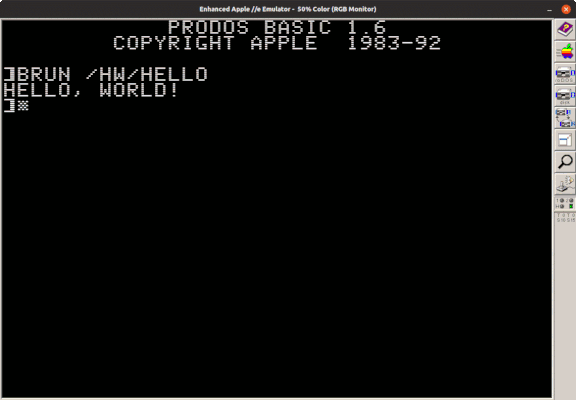
$ java -jar ac.jar -p disk.po hello bin $2000 < ./helloFiring up our emulator, we boot Prodos and run our binary. Behold!